A Lightweight AI Delivery Path For Small Teams Shipping Real Product
AI A Lightweight AI Delivery Path For Small Teams Shipping Real Product Adam Sinnott 28 April, 2026 AI coding...


Adam Sinnott
28 April, 2026
AI coding tools are becoming part of normal product delivery. Founders, CTOs, and product leads are testing assistants, agents, code review tools, and automated change generation because the promise is useful: more progress from a small team.
The value shows up when the team has a simple path for turning generated work into shipped product.
Without that path, the speed gain gets lost in review. Pull requests get larger. The intent and impact of the change becomes harder to verify. Reviewers spend time determining what changed and why, and whether the change is ready for real users.
A better setup is much lighter than a large internal process. Small teams need clear steps, checks, and releases.
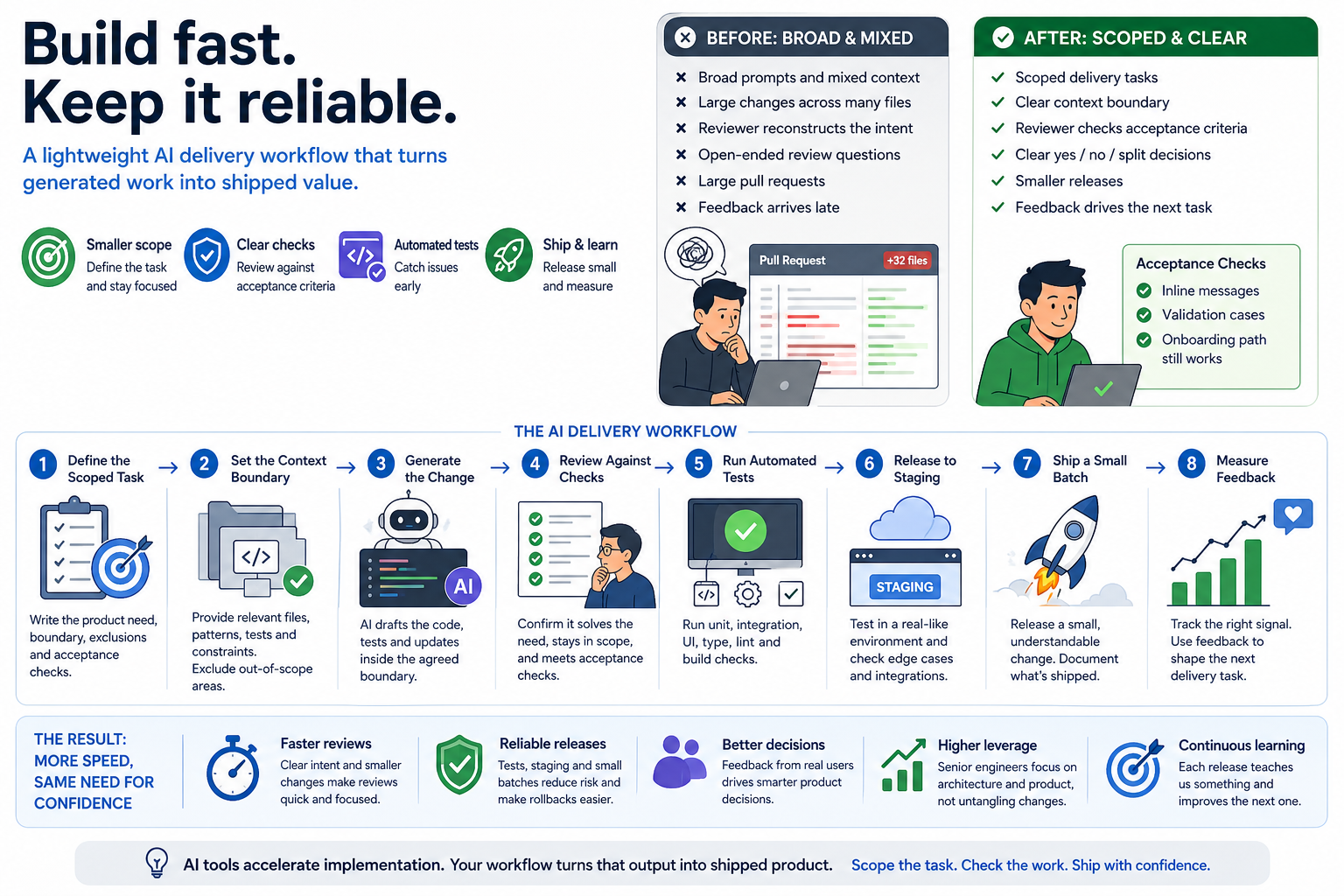
Build fast. Keep it reliable.
A small product team starts using AI tools because delivery pressure is real.
A founder wants the next demo ready. A CTO wants fewer blocked tasks. A product lead wants faster iteration on feedback from users. The team already understands that AI can help with scaffolding, refactoring, test creation, documentation, and repetitive implementation work.
The practical question becomes:
This is where the workflow matters. The tool can accelerate implementation, but the team still needs a reliable path from product need to live release.
A common early pattern looks like this.
A product need is described broadly. The AI tool is given a lot of mixed context. The generated change touches several files, sometimes across UI, data handling, validation, tests, and copy. The output appears useful, so it becomes a pull request.
Review then becomes slow for understandable reasons.
The reviewer has to reconstruct the original intent. They have to check whether the generated change has stayed inside the right boundary. They have to decide whether related changes are necessary or accidental. They have to look for missing edge cases. They may have to ask for the task to be split after the work has already been done.
The team has moved quickly, but the review has become open-ended.
A representative example:
A small SaaS team wants to improve onboarding. The broad request is to “make onboarding smoother and add missing validation.” The generated change updates the form, adds validation rules, changes some copy, adjusts an API call, and touches a shared user model. Each part may be reasonable, but the reviewer now has several decisions to make at once.
The review conversation becomes less about acceptance and more about discovery.
The useful shift is to make the product need smaller before AI gets involved.
Instead of asking for a broad improvement, the team turns the need into a scoped delivery task. The task should explain the user-facing change, the boundary of the work, and the checks that define success.
For example:
Improve onboarding validation for the company details step. Keep the change inside the existing onboarding flow. Do not change the shared user model. Show inline messages for missing company name and invalid website URL. Add or update tests for the validation cases. The change is ready when the existing onboarding path still passes and the new validation cases are covered.
That level of structure gives the AI tool a narrower job. It also gives the human reviewer a clearer target.
The work now has a boundary:
This is the main lesson for small teams. AI-assisted delivery improves when the task is shaped before generation starts.
A practical path can be simple.
This does not need a heavy process. It needs enough structure that speed does not create avoidable review work.
Start with one product need. Write it in plain language before adding technical detail.
Good task framing includes:
For a small team, this is often enough. The task should be specific enough that a reviewer can say yes, no, or “split this” quickly.
AI tools perform better when the context is relevant and contained.
A good context boundary might include:
It should also exclude work that belongs in a separate task.
For example, if the task is to improve validation on one screen, the AI tool probably does not need to redesign the whole onboarding flow, change account creation, or refactor shared data models.
Clear context helps the generated change stay close to the product need.
Once the task and context are clear, AI can help with the implementation.
This is where the speed gain is real. The tool can draft the code, fill in repetitive patterns, suggest tests, update copy, and handle small refactors inside the agreed boundary.
The important part is that generated code enters the same delivery path as any other code. It still needs review. It still needs tests. It still needs a release decision.
The tool is part of the workflow, not a replacement for the workflow.
Review becomes faster when the reviewer is checking against known criteria.
Instead of asking “does this look okay?”, the reviewer can ask:
This changes the review from an open-ended investigation into a focused decision.
For small teams, that matters. Senior review time is scarce. AI should reduce repetitive implementation work, not create a larger queue of unclear changes for the most experienced person to interpret.
Automated tests give the team a faster answer on the basics.
The right level depends on the product, but common checks include:
Tests should map back to the task. If the change adds validation, test the validation. If it changes a customer-facing flow, test the core path. If it touches a shared integration, test the handoff.
The goal is not maximum test volume. The goal is useful confidence before the change reaches real users.
Staging is where the team checks the change in a product-like environment.
For AI-assisted work, staging helps catch issues that code review and automated checks can miss:
This step is especially useful for teams shipping mobile apps, workflow tools, internal systems, or AI-supported product features. The implementation may pass tests while still needing a product judgement.
Smaller releases make AI-assisted delivery easier to control.
A small release gives the team a cleaner view of what changed. It also makes rollback and follow-up decisions easier.
This does not mean every change has to be tiny. It means the release should be understandable. A reviewer should be able to explain what is going live, who it affects, and what the team will watch after release.
For a startup or growing product team, that level of clarity is often more valuable than adding another process layer.
The final step is feedback.
After release, the team should look for the signal that matches the task:
AI-assisted delivery should help the team learn faster. The release is part of the learning loop.
The biggest improvement is usually review clarity.
Here is the before-and-after pattern:
| Before | After |
|---|---|
| Broad generated changes | Scoped delivery tasks |
| Mixed context | Clear context boundary |
| Reviewer reconstructs the intent | Reviewer checks against acceptance criteria |
| Large pull requests | Smaller releases |
| Open-ended review questions | Clearer yes, no, or split decisions |
| Feedback arrives late | Feedback shapes the next task |
The team still uses human judgement. The difference is that the reviewer has a clearer job.
This is where AI-assisted delivery becomes practical for small teams. The senior person can spend less time untangling generated work and more time making product and architecture decisions.
The release process also becomes calmer.
A scoped task produces a smaller change. A smaller change is easier to test. A tested change is easier to stage. A staged change is easier to release. A clear release is easier to measure.
That sequence is simple, but it is powerful.
It gives the team a better answer to useful release questions:
For teams using AI coding tools, these questions matter more as output volume increases. More generated work means the release path needs to be clear enough to keep up.
Take a small product team trialling AI-assisted development.
The team starts by using AI for broad implementation prompts. The output is impressive, but the review queue becomes harder to manage. Several changes arrive with useful code mixed with extra refactors, copy updates, and adjacent logic changes.
The team then adjusts the workflow.
Each AI-assisted task now starts with a short delivery brief:
The AI tool is used after that brief is clear. The generated change is reviewed against the brief. Automated checks run before staging. The team releases smaller batches and watches the specific product signal after release.
The result is practical rather than dramatic.
Review becomes clearer. Releases become smaller. The next product decision becomes easier because the team can see what changed and what happened afterwards.
No invented metric is needed to make the point. The proof is in the process: less time spent interpreting broad generated work, more time spent shipping understandable changes.
AI works best in small delivery systems that already know how to make decisions.
The tool helps produce work. The team still needs to decide what matters, where the boundary is, how the change will be checked, and how it will be released.
A good AI delivery workflow gives each person a clearer role:
This is enough structure for many small teams. It supports speed without asking the team to behave like a large engineering department.
If a small team asked AppCreators to help improve AI-assisted delivery, the first checks would be practical.
We would look at recent tickets, prompts, pull requests, and release notes.
The aim would be to see whether each task has a clear product need, a sensible boundary, and acceptance checks that a reviewer can use.
We would check what the AI tool is being given:
Better context usually improves both generated output and review speed.
Slow review often comes from missing intent.
We would look for pull requests where the reviewer has to work out the product goal, the expected behaviour, or why adjacent files changed. Those are good candidates for a tighter delivery path.
A useful test setup is tied to the type of work being shipped.
For mobile, web, workflow software, AI features, and internal tools, the checks should cover the real path users or staff rely on. The right tests make release decisions easier.
We would inspect whether AI-assisted changes are reaching staging and production in batches the team can understand.
If several product decisions are bundled together, feedback becomes harder to interpret. Smaller batches make the next step clearer.
Every release should help the team learn something.
That might be user completion, support questions, internal time saved, onboarding progress, conversion, error rate, or qualitative feedback from the team using the tool.
The right measure depends on the product need.
For teams trialling AI-assisted delivery, this template is enough to begin:
## Product Need
What user, customer, or internal problem are we solving?

## Scope
What part of the product can change?

## Out Of Scope
What should stay untouched in this task?

## Context For AI
Which files, patterns, tests, or constraints should the tool use?

## Acceptance Checks
What must be true for this change to be accepted?

## Test Plan
Which automated or manual checks are needed?

## Release Plan
Will this go to staging first? Who reviews it? What is watched after release?
The template works because it slows the task down at the right point: before code generation, where the cost of clarity is low.
AI-assisted development can help small teams ship faster, especially when they have limited engineering capacity and real product pressure.
The teams that get the most from it tend to put structure around the work:
That is a realistic path for startups and growing product teams. It does not require a large internal process. It requires enough control for generated work to become useful shipped software.
If your team is trialling AI-assisted development and wants faster releases without losing control, AppCreators can help shape the workflow around the product.
AI A Lightweight AI Delivery Path For Small Teams Shipping Real Product Adam Sinnott 28 April, 2026 AI coding...
Uncategorized Prototype, MVP, or Production Product? A Practical Decision Guide for Teams With Early Traction Adam Sinnott 23 April,...
AI Small Studios, Big Capabilities: How Agentic Workflows Accelerate Software Delivery Adam Sinnott 15 April, 2026 Software development is...
Case Studies Smarter, Faster Information Retrieval: How AI-Powered RAG and CAG Can Streamline Your Business Tasks Adam Sinnott 28...
Droxford, Meon Valley, Hampshire
info@appcreators.co.uk
(+44) 01489 287009
AppCreators. All rights reserved.